A payment flow that flexed with the business
Talent Systems is a performer membership platform where actors sign up, renew and upgrade. I rebuilt its confusing payment flow into a flexible, decision-confident system.
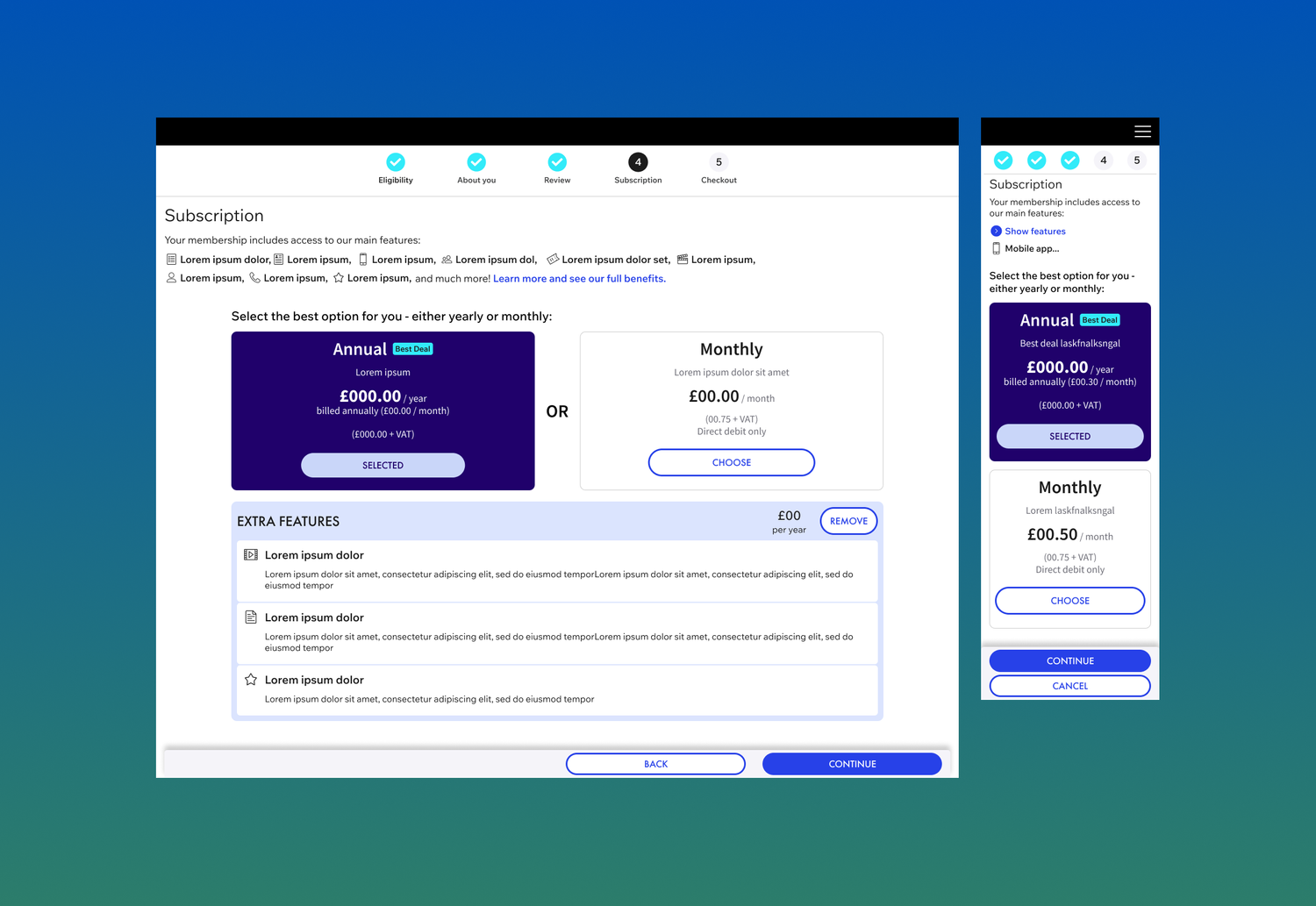
A flow that hid what it was selling
The membership payment experience was so confusing that performers had almost no visibility of upgrade options. The flow was failing to convert users who were already motivated to invest in their membership.
The root of it was structural. As a new membership tier was introduced, the flow had been shaped around the data team's requirements rather than what performers needed to understand at the point of choice. The tiers weren't legible, and upgrading didn't feel like something to trust.
Designing a flow that could survive a moving target
-
01
Analysing the inherited design
I started by auditing the design I'd inherited, working through the existing membership purchase screen end to end. The friction was a combination of confusing information and key elements split between pages. Customers simply couldn't understand what they were choosing between, or trust that they were picking the right thing.
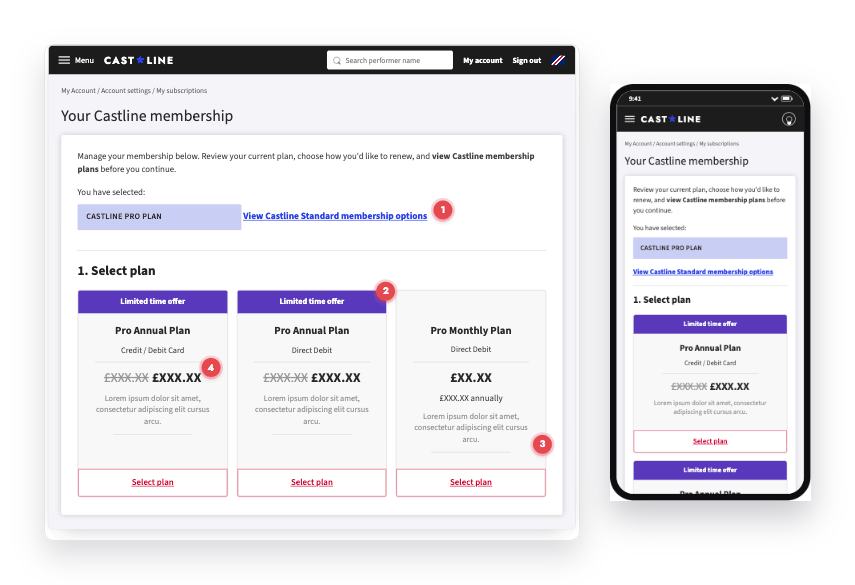
The inherited purchase screen, audited end to end — desktop and mobile. Brand, names and figures anonymised; the recurring problems annotated. - 1Switching membership plan was a small, easily-missed text link. The most important branching decision on the page was hidden in body copy.
- 2The plan options were confusing and near-identical: two cards shared the same name and differed only by payment method.
- 3There was no description on this page of what each tier actually offered.
- 4Pricing was presented inconsistently across cards and pages, so the true cost was hard to compare.
-
02
Comparative analysis
I reviewed similar membership models and wider subscription conversion patterns to understand best practices. The consistent finding was that the highest-converting membership experiences reduced cognitive load at the comparison stage, presenting it with clear visual hierarchy and progressive commitment steps. We used this to frame the redesign around decision confidence, not just visual clarity.
-
03
The defining challenge
Designing for uncertainty
The most significant design challenge wasn't aesthetic — it was structural. Business decisions on membership tier configurations were still being made while design was underway, meaning the design needed to work for multiple possible outcomes simultaneously. Under a tight timeline I had to be proactive, so I mapped clear user journeys for every potential path — new sign-up, renewal, upgrade, downgrade — and built adaptable components that could flex across multiple pricing structures. Whichever direction the business chose, the experience was ready to adapt without starting over.
User type01Access02Plans03Choose plan04Extras05Details06Payment07ConfirmNew userFirst-time sign-upSign upCreate accountBrowse plansChoose planAnnual vs monthlyAdd extrasYour detailsPayRecurlyYou're inReturning userRenew or reactivateLog inReactivateReview planRenew planKeep or switchAdd extrasConfirm detailsPayRecurlyRenewedExisting memberMid-contract changeAccountSettingsCurrent planUpgrade planUp- or downgradeAdd add-onsConfirm changesPayRecurlyUpdatedSwipe to see the full flow → -
04
Prototype testing — validating before handoff
Interactive Figma prototypes were tested with users before final handoff, focusing on copy clarity, button hierarchy and step logic. Testing confirmed the direction but surfaced specific language issues around tier naming — a finding that fed directly into copywriting decisions rather than requiring structural redesign.
-
05
Iteration 2 — responding to user pushback post-launch
Following the initial launch, user pushback on the newly introduced membership tiers created pressure for a rapid second iteration. With business decisions still evolving, the adaptable component system built in step 3 proved its value — rather than rebuilding from scratch, iteration 2 rerouted the user journeys and adjusted tier presentation within the existing framework. The design system absorbed the change without structural rework.
A flow built around decision confidence and structural flexibility
A rebuilt membership flow that made the offering legible at the moment of choice — and could flex with the business behind it.
- Clarified tier comparison — a clean, guided layout connecting membership selection, pricing and payment in a single coherent flow, removing the comparison ambiguity that was causing drop-off.
- A step tracker to orient people in the flow and show how far they'd come and what was left.
- A two-page process that split the decision load — choose the membership plan first, then payment type — so each step asked for one clear choice.
- Supporting copy to reinforce the UX — making each choice legible at the moment it mattered.
- Adaptable component system — user journeys mapped and components built for all four paths (new sign-up, renewal, upgrade, downgrade) in a structure that could accommodate multiple tier configurations as business decisions evolved.
- Dynamic branding — updated UI aligned with the new visual identity, increasing engagement at the checkout stage.
- Consolidated checkout — multiple user paths unified into one flexible system, reducing developer workload and maintenance overhead.
What the redesign delivered
-
Visibility
~100% increase in the visibility of membership upgrade options following launch. Performers who previously had almost no awareness of upgrade options were now seeing them clearly at the point of decision.
-
Conversion, honestly measured
Isolating the UX impact on sign-up rates was complicated by a simultaneous business decision to restructure membership tiers — a confounding factor. But the visibility metric tells the clearer story.
-
An adaptable system
When a second iteration was required, the framework built to absorb business uncertainty took on much of the change without a full rebuild — saving time and development cost under real deadline pressure.
Designing for ambiguity became the skill I'm proudest of on this project — I learned that building systems which hold up under changing business conditions is as much a part of product design as building for changing user needs.